

Extension Structure
The source of an Extension comprises a directory that follows the following structure:
DirectoryExtensionDirectory
- manifest.json Contains Extension meta data.
- content.js Injected into every single web page’s content, i.e.,
windowscope. - background.js A persistent service worker that runs in the background.
- popup.html A persistent, toggleable modal that pop up on top of the current page.
- newtab.html A page that is initially displayed in every new tab.
- side_panel.html A persistent, toggleable side panel that can be opened programmatically.
Directoryexample_directory Individual files (assets, modules, …)
- example.jpg
- …
- …
Only the manifest.json file is required. For instance: if you only want to customize the page that opens in a new tab, provide a newtab.html. Again, Webfuse Extensions aim for parity with browser Extensions. You can hence draw from knowledge, or adjacent information regarding web/browser extensions.
Key Differences from Chrome Extensions
Section titled “Key Differences from Chrome Extensions”Webfuse extensions use almost the same manifest format and APIs as Chrome Manifest V3 extensions, but the execution environment differs. Here are the key differences:
Manifest differences
Section titled “Manifest differences”Webfuse supports a subset of Chrome’s manifest.json fields and adds a few of its own.
Webfuse-exclusive fields (not available in Chrome extensions):
| Field | Description |
|---|---|
env |
Configurable environment variables accessible via browser.webfuseSession.env. |
virtualized_browser_only |
Load the extension only in the virtualized browser. |
Chrome fields not supported in Webfuse:
| Chrome Field | Notes |
|---|---|
permissions |
Chrome’s permissions array (activeTab, storage, tabs, etc.) is not used. Webfuse grants API access based on the session context instead. |
content_scripts[].css |
CSS file injection is not supported. Inject styles from JavaScript instead. |
content_scripts[].run_at |
Timing control (document_start, document_end, document_idle) is not supported. Scripts run after the document loads. |
content_scripts[].world |
Execution world (MAIN vs ISOLATED) is not supported. Content scripts always run inside the Webfuse sandbox. |
web_accessible_resources |
Not supported. |
options_page / options_ui |
Extension settings pages are not supported. Use env for configuration. |
commands |
Keyboard shortcut definitions are not supported. |
content_security_policy |
Custom CSP overrides are not supported. Use host_permissions to allow external domains. |
Fields that behave differently:
| Field | Difference |
|---|---|
content_scripts[].matches |
Defaults to ["<all_urls>"] if omitted (Chrome requires it explicitly). |
host_permissions |
Only updates the CSP connect-src directive for the extensions origin. Does not grant broader host access like in Chrome. |
action.default_icon |
Only size 24 is supported (used for the session topbar icon). |
Content scripts run inside the Webfuse sandbox
Section titled “Content scripts run inside the Webfuse sandbox”Content scripts are injected into the proxied page and run inside a JavaScript sandbox that makes the page appear as if it is loaded from its original domain. This means:
window.location.href,document.domain,location.hostnamereturn the original domain values (e.g.https://x.com), not the proxied URL- Cookies appear as if set on the original domain
- The page behaves as if it is running on the original origin
Content scripts are not affected by host_permissions — they follow the page’s own security context.
Other components run from a separate origin
Section titled “Other components run from a separate origin”The popup, side panel, background/service worker, and new tab page are served from a dedicated extensions origin (extensions.<your-domain>), separate from the proxied page. Because they run on this separate origin, the browser’s Content Security Policy (CSP) applies — connect-src will block outbound fetch() and XMLHttpRequest calls to external domains unless explicitly allowed via host_permissions.
CORS applies to non-content components
Section titled “CORS applies to non-content components”Because popup, side panel, and background scripts run from the extensions origin, CORS rules apply to their outbound requests, the target server must send appropriate Access-Control-Allow-Origin headers or the browser will block reading the response.
Workaround: Route requests through your own backend that adds CORS headers.
Manifest
Section titled “Manifest”The entry point of an Extension is the manifest.json file, which is a JSON file that contains meta information about the Extension, such as name, version, and relative paths to component files.
{    "manifest_version": 3,
"name": "example-extension", "version": "1.0", "background": { "service_worker": "background.js" }, "content_scripts": [ { "js": ["content.js"], "matches": ["<all_urls>"], "all_frames": false, } ], "action": { "default_icon": { "24": "top-bar-icon.png" }, "default_popup": "popup.html" }, "chrome_url_overrides": { "newtab": "newtab.html" }, "side_panel": { "default_path": "side_panel.html", "overlay": false }, "host_permissions": ["<all_urls>"], "homepage_url": "https://github.com/owner/repo", "virtualized_browser_only": true, "env": [ { "key": "foo", "value": "bar", "description": "This is a description of the environment variable" } ], "icons": { "16": "favicon.png", "32": "side-panel-icon.png", "48": "icon.png" }}background.service_worker
Section titled “background.service_worker”The service worker which runs in a separate thread. It is available for all Session participants.
content_scripts
Section titled “content_scripts”List of content scripts which will be loaded in all tabs. It is loaded only on the tab’s owner side:
js(array): Array of JavaScript files to injectmatches(array): Array of match patterns that specify which pages the content script runs on. For example,["https://github.com/*"]runs only on GitHub, while["<all_urls>"]runs on all pages. Uses the same pattern syntax ashost_permissions.all_frames(boolean, optional): Iftrue, script runs in all frames including iframes. Iffalse(default), runs only in the main frame. This affectsbrowser.tabs.sendMessage()frame targeting with theframeIdoption.
action.default_popup
Section titled “action.default_popup”This is the popup window which will be opened when the user clicks on a button in the Extension. It is available for all Session participants and will show the popup window with the content of the specified HTML file.
action.default_icon
Section titled “action.default_icon”The extension popup related icons. The available icons are:
24- The icon of the Extension which will be displayed in the topbar of the Session, if not provided, the default icon will be used in the topbar of the Session. It is not used as a fallback icon for the new tab page and side panel components.
chrome_url_overrides.newtab
Section titled “chrome_url_overrides.newtab”The new tab page which will be opened when the user clicks on the ‘+’ button in the tab bar. It is available for all Session participants.
side_panel.default_path
Section titled “side_panel.default_path”The side panel page which will be opened if user calls browser.sidePanel.open() API method for the extension.
side_panel.overlay
Section titled “side_panel.overlay”Optional boolean (default false) that controls how the side panel is laid out relative to the tab content:
false(default) — the side panel pushes the tab content aside; the tabframe shrinks to make room.true— the side panel floats above the tab content; the tabframe does not reflow.
This is the initial value; extensions can change it at runtime via browser.sidePanel.setOverlay().
host_permissions
Section titled “host_permissions”List of URL patterns that control which external domains your extension can make requests to. It works by updating the Content Security Policy connect-src directive for the extensions origin. Without the correct host_permissions, outbound fetch() and XMLHttpRequest calls from your popup, background, side panel, and new tab scripts will be blocked by CSP. This does not affect content scripts — they run in the page’s security context.
A match pattern is a URL with the following structure, used to specify a group of URLs:
<scheme>://<host>/<path>-
scheme: Must be one of the following, separated from the rest of the pattern using a colon followed by a double slash (://):
http,https, wildcard*, which matches bothhttpandhttps. -
host: A hostname (www.example.com). A * before the hostname to match subdomains (*.example.com), or just a wildcard *. - If you use a wildcard in the host pattern, it must be the first or only character, and it must be followed by a period (.) or forward slash (/).
-
path: A URL path (/example). For host permissions, the path is required but ignored. The wildcard (/*) should be used by convention.
Special case:
"<all_urls>" - Matches any URL that starts with a permitted scheme
Read more about match patterns here.
homepage_url
Section titled “homepage_url”The URL of the homepage of the Extension. If defined and is a valid public GitHub repository URL, the Extension can be imported from a template.
virtualized_browser_only Webfuse Exclusive
Section titled “virtualized_browser_only ”- If the
virtualized_browser_onlyflag is set totrue, the Extension will be loaded only in the virtualized browser. This is useful if you want to offload some operations to the virtualized browser. You can also use this feature to hide some functionality or data from the end-user (e.g. credentials, etc.).

You can also use this feature to run automation tasks in the virtualized browser and control your Session using the Automation API.
env Webfuse Exclusive
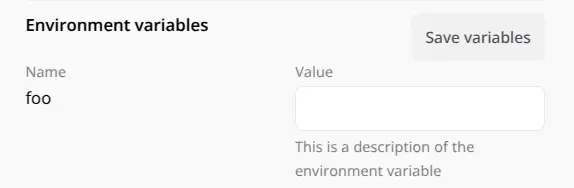
Section titled “env ”You can use the env key to pass environment variables to the Extension. These variables will be available in all components of the Extension. To use environment variables defined in the manifest.json file, you can use the browser.webfuseSession.env object. This is useful if you want to use some shared data between components of the Extension or if you want to make your Extensions shareable and let users pass their own values to the Extension. If you want to share your Extension with environment variables feature to someone else, you can share a manifest.json file with env section populated with the objects with values as empty strings:
{ "env": [ { "key": "foo", "value": "", "description": "This is a description of the environment variable" } ]}console.log(browser.webfuseSession.env.foo); // barAfter that, variables can be set or overridden from the Session Editor’s Extension details tab.
A set of icons that will be displayed for the Extension in different parts of the Session UI. The following sizes are used:
16- Favicon used for extension with Newtab Component to be displayed in the new tab tile and browser tab32- Icon used for extension with Side Panel Component to be displayed in the header of the extension side panel component48- Icon used for extension editor on the list of extensions and extension details views
Background Component
Section titled “Background Component”The service worker is a script that can handle all logic of the Extension - it is run on every participant’s side as soon as they join the Session.
Content Component
Section titled “Content Component”The content script is a script that is injected into each web page. This is a script that is executed in the context of the web page and only on the Tab Owner’s side. This script has access to the DOM of the web page and can manipulate it.
You can have multiple instances of this script running - one for each tab and or each iFrames.
Popup Component
Section titled “Popup Component”The popup page is a window that is opened when the user clicks on a button in the Extension or by calling browserAction.openPopup() API method, its content is defined by the HTML file specified in the manifest.json file.
Newtab Component
Section titled “Newtab Component”The new tab page is a page that is opened when the user clicks on the ‘+’ button to open a new tab - or when the Session is started to specifically open the New Tab Page. By configuring this page you can basically customize the new tab page within Sessions allowing you to style it as you want. By default, Webfuse shows a URL input field, and possibly buttons for collaborative features.
Side Panel Component
Section titled “Side Panel Component”The side panel component is a panel that is opened on the right side of the Session UI. It is available for all Session participants and can be opened programmatically from any extension component except content script.
Session theme
Section titled “Session theme”Webfuse injects a <meta name="color-scheme"> tag and a matching <style>:root { color-scheme: ... }</style> rule reflecting the current session theme into Extension popup, side panel, and new-tab HTML. The simplest way to make your styles follow the session theme is the light-dark() CSS function, which resolves against the document’s color-scheme:
:root {    --bg: light-dark(#ffffff, #1a1a1a);    --fg: light-dark(#111111, #eeeeee);}
body {    background: var(--bg);    color: var(--fg);}
If you need to read the theme in JavaScript:
const theme = document.querySelector('meta[name="color-scheme"]')?.content || 'light';